
View lyrics when you play songs in Windows Media Player
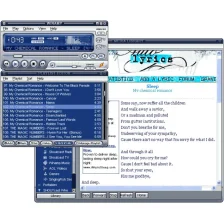
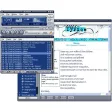
If you're someone who listens to your music collection in Windows Media Player then now, thanks to Lyrics Plugin for Windows Media Player you can enjoy the words to your songs within the player as you listen to them.
As long as you're connected to the Net the program will automatically search for the lyrics and display them in real time.
Unfortunately, probably due to my rather eclectic taste in music, the application failed to provide the words to many of my tracks.
However, there is a neat facility for quickly adding lyrics to a particular song so over time more songs will have lyrics attached to them as people continue to upload them.






























User reviews about Lyrics Plugin for Windows Media Player
by Roy Campbell
Takes a little time to load lyrics initially for a playlist. Edit function occasionally freezes and Configure doesn't appear to work at all.
by Paul Hicks
Useless..
It doesn't work. Plain and simple. Uninstalled.It did nothing, there is nowhere to go for guidance. If I'm using it wrongly, I have no way of knowing. Waste of time.
Pros:
Nothing.
Cons:
Make it work. More
by Anonymous
Lyrics Plugin Affect on Fonts.
The program works pretty well with Media Player 12 and Windows 7 Home Premium. It doesn't find lyrics 100% of the time but in those cases I'd look them up and insert them myself using Windows Media Plus!. Another thing I didn't like is that it doesn't display the lyrics on the Now Playing screen in Media Player. It's like it creates an additional screen. I did notice a change in fonts on certain web pages after the plug-in was installed. Some fonts were bolded and others were in italics that never were before. I did a system restore to right before I installed the plug-in and everything returned to normal. It's because of the font behavior to web pages that I will not use the plug-in anymore.
Pros:
Finds a lot of song lyrics automatically
Cons:
Changes fonts on some web pages
Lyrics do not appear on WMP12 Now Playing screen More
by Anonymous
HOW does it work.
I just downloaded lyrics plugin for my media player and i dont know how to use it. What am i doing wrong? And what do i click on for it to play the lyrics More
by Anonymous
Worse than useless.
Didn't install at all......installer hung up, locked up the system......tried it several times, same result.
Who cares if it can't find all the lyrics? If it doesn't install, it is moot.
Pros:
None
Cons:
Why bother? More
by Anonymous
doesn't work properly for Media Player 11 and Windows 7.
doesn't work properly for Media Player 11 and Windows 7 - lyrics do NOT show up when files are started within media player. Only works when files are started from Windows file manager. More